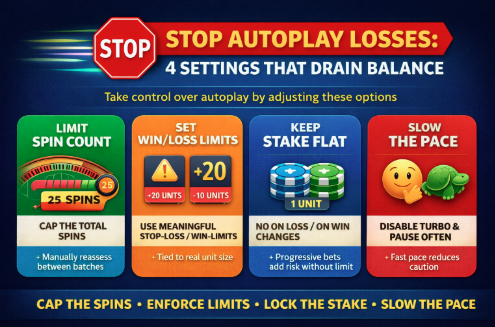
Autoplay doesn’t “cause” losses—uncontrolled settings do. The fastest way to stop balance drain is to treat autoplay like a pre-committed session contract: cap the number of spins, cap the loss, cap the stake scaling, and cap the pace. If any of those four controls are missing or mis-set, your bankroll gets exposed to long stretches of negative variance without the natural pauses where humans normally reassess.
1) Spin Count: The “Just a Few More” Multiplier
The most common autoplay leak is leaving spin count too high (or infinite). Even with a small bet, volume is what converts a mild house edge into a meaningful expected loss and, more importantly, increases the probability you hit a deep downswing before you stop.
Why it drains balance
- Expected loss scales with total amount wagered. If you bet 1 per spin and run 500 spins, you’ve wagered 500 total; at a 2.7% edge, the long-run expected loss is about 13.5. At 2,000 spins, that’s about 54.
- Variance scales with volume too. More spins means more chances to hit a cold pocket where you keep betting through it.
Practical setting
- Set autoplay to a short batch (example: 25 to 50 spins), then force a manual check-in.
- Add a rule: you can only start the next batch after you answer two questions: “Am I still within my loss cap?” and “Is my stake still the same as planned?”
Real-world example
A player planning a 20-minute session might choose 40 spins at a normal pace. If they set 400 spins “so they don’t have to think,” they’ve removed the single best protection they have: the stop-and-evaluate moment.
2) Autoplay Pace: Fast Spins Hide the Damage
Speed settings are an underrated bankroll drain. Faster spins reduce friction, which reduces self-awareness. You don’t feel each bet leaving, and you don’t register patterns like “I’ve been down for 10 minutes.”
Why it drains balance
- At 10 seconds per spin, 60 spins take about 10 minutes. At 2 seconds per spin, 60 spins take about 2 minutes. Your bankroll can drop quickly enough that you only notice once you’ve crossed your comfort threshold.
- Fast autoplay also compresses emotional reaction time. Many players only realize they want to stop after several more spins have already fired.
Practical setting
- Choose the slowest pace you can tolerate, or disable “turbo/quick spin” during autoplay.
- If there’s a “skip animations” toggle, keep animations on during autoplay; the micro-delay is a behavioral safeguard.
- Add a “pause every X spins” setting if available (example: pause every 10 spins).
Simple control test
If you can’t accurately estimate how many spins have occurred in the last five minutes, your pace is too fast for responsible control.
3) Stake Escalation: Progressive Betting + Autoplay Is a Bankroll Trap
Autoplay becomes dangerous when paired with any setting or habit that increases stake after losses (martingale-style) or after wins (paroli variants), because the progression can compound quickly before you notice.
Why it drains balance
Progressions are designed around the idea that a win will “reset” you. Autoplay removes the manual intervention that normally forces you to confirm the next step. The risk is not that progressions “never work,” but that they can create:
- Large, sudden bet sizes
- Hitting table limits
- Hitting bankroll limits
- A single sequence that wipes out multiple previous sessions of gains
Concrete example (martingale on even chances)
Start 1 unit and double after each loss: 1, 2, 4, 8, 16, 32. After 6 consecutive losses you’ve staked 63 units to win 1 unit net (before edge). That’s not rare enough to ignore over time, and autoplay can run through it without hesitation.
What to set (or avoid)
- Avoid any autoplay option that says “increase bet on loss/win” unless you’ve calculated your maximum step and can tolerate the worst-case drawdown.
- If you insist on a progression, predefine:
– Maximum step (example: stop after 3 doubles)
– Hard stop loss that triggers before the bankroll is threatened (example: stop at -15 units)
- Prefer fixed-stake autoplay for any session where your goal is control, not chasing.
4) Stop-Loss and Win-Limit: The Defaults Are Often Too Loose (or Off)
The biggest single setting that prevents autoplay from draining a balance is the stop-loss. The second is a win-limit that banks results before variance gives them back. The mistake is assuming defaults are protective; many are set high, disabled, or defined in ways that don’t match your stake.
Why it drains balance
Autoplay runs without the natural “pain point” that makes players stop manually. A stop-loss restores that boundary automatically.
A common misconfiguration: setting stop-loss as a currency amount without relating it to stake size. If you bet 2 per spin and set stop-loss to 200, that allows 100 losing spins worth of exposure on simple even-chance bets—often far beyond what the player emotionally meant by “I’ll stop if I’m down.”
Practical method: set limits in units, not money
- Define 1 unit = your base stake.
- Set stop-loss in units based on session tolerance (example: 20 units).
- Convert to money only after deciding the unit number.
Use a win-limit that respects volatility
Win-limits aren’t about “locking profit”; they’re about stopping when you’re ahead in a game with negative expectancy. A typical win-limit might be 10 to 25 units depending on volatility and session length. Set it before you start, not while you’re up.
Data point (why this matters in roulette specifically)
Roulette outcomes are independent, so autoplay doesn’t “smooth” results; it only increases volume. Analysis shows the European roulette house edge is 2.7% (Visit Site to see source), which means every additional unit wagered increases expected loss by 0.027 units over the long run—autoplay settings that raise wager volume (more spins, faster pace, larger stakes) directly magnify that drag.
Autoplay Risk Checklist: A 60-Second Pre-Flight
Before you press autoplay, check these four items in this order (most impact first):
- Stop-loss: Set in units (example: -20 units). Confirm it is enabled and applies to the current game mode.
- Spin count: Cap the batch (example: 25–50). No infinite spins.
- Stake rules: Fixed bet only. Disable any “on loss/on win” changes.
- Speed/pause: Normal speed, no turbo. Pause every 10–20 spins if available.
One extra insider tip: match limits to your “worst 10 minutes”
Ask: “If I hit a miserable 10-minute run, what’s the maximum I’m willing to lose?” Then set your stop-loss so it triggers before that feeling turns into chasing. Most “I lost control” stories start with a limit that was technically set but practically meaningless.
Common Autoplay Misreads (and How to Correct Them)
“I’ll just watch it and stop when it feels bad.”
Autoplay’s speed and repetition numb feedback. Correct it by using hard stops (spin count + stop-loss), not feelings.
“Higher stakes for fewer spins is safer.”
Higher stakes increase variance per spin. Fewer spins may reduce exposure, but a short high-stake burst can still produce a sharp drawdown. Correct it by deciding risk in units and keeping stakes consistent.
“If I’m due, autoplay will catch the swing.”
There is no “due.” Independent trials don’t compensate for previous results. Correct it by treating streaks as normal variance and keeping stake fixed.
The Bottom Line
Autoplay drains balances when it removes decision points and quietly increases wager volume through long runs, fast pacing, or stake escalation. Cap spins, slow the pace, lock the stake, and enforce meaningful stop-loss and win-limit settings in units—not vibes.
